Your SharePoint is full of files nobody opens.

And you’re paying Microsoft a fortune to keep them.

ArchiveBridge moves the cold ones to storage ~20× cheaper—every byte verified before anything leaves SharePoint, a restore link left in its place. The free read-only scan shows your exact reclaimable volume—and the estimated saving—in minutes.

~20× cheaperSHA-256 verified before deleteBuilt & supported in Australia
Your estimated SharePoint overageover allocation
US$434/mo
Based onTB acrossseats

US$0.20/GB/mo over Microsoft’s documented allocation (1 TB + 10 GB/licence), ex tax. Your scan returns the exact reclaimable volume.

The SharePoint Storage Tax

Microsoft charges about US$0.20 per GB a month, before tax, once you pass your allocation. Most of those files were last touched in 2021.

You can’t buy less Microsoft. You can’t ask users to delete things—they panic. And Microsoft’s own archive tier is just paying Microsoft again to cold-store your own files. You’re renting premium real estate for digital dust.

1 TB of cold data ≈ US$205/mo on SharePoint. ≈ US$10/mo on object storage.

Microsoft list price, before tax.

MICROSOFT — TAX INVOICEMONTHLY
Microsoft 365 E3 — 500 seatsUS$22,800
Exchange Online ArchivingUS$1,650
SharePoint storage add-on (overage)US$3,940
Teams PhoneUS$2,100
Total / monthUS$30,490
Illustrative invoice for a ~25 TB SharePoint estate on 500 seats. Your overage line scales with your data — the calculator below uses your numbers.
How it works

The whole process is four steps.

01

Scan — read-only

Sign up and grant Microsoft 365 admin consent. The screen Microsoft shows your admin lists two read-only permissions: Sites.Read.All and Organization.Read.All — no write, no delete. (The second just reads your licensed seat count, to size your storage allowance.) An automated scan returns exactly what's reclaimable, in GB and dollars. The app that can archive is a separate registration, consented later, only if you proceed.

02

Copy & verify

Each file is copied to your own S3-compatible object storage — configured in the console, connection tested first — then SHA-256 hashed. If the hash doesn't match, we stop and the original is never touched.

03

Stub & reclaim

Only after verification is the original removed from SharePoint — retained in your bucket, with a clickable HTML page left in its place. Anyone who opens it gets a one-click Restore button — no IT ticket.

report-2021.docx.htmlSHA-256 ✓
This file was archived to free up SharePoint storage.
one click · no IT ticket
04

Restore

Users restore from the stub's button; IT can restore from the console; or surface everything as a normal drive via CentreStack. Reversible for as long as you keep the file.

Download → Hash → Upload → Verify → Delete. In that order, every time.

Watch the scan happen.

Sixty seconds, start to finish: the three-field signup, the read-only consent your Global Admin approves, your reclaimable number — and the one-click business-case PDF you can hand to your CEO or finance team.

Recorded against a demonstration tenant — all names and figures are fictional.

The console

This is the actual product.

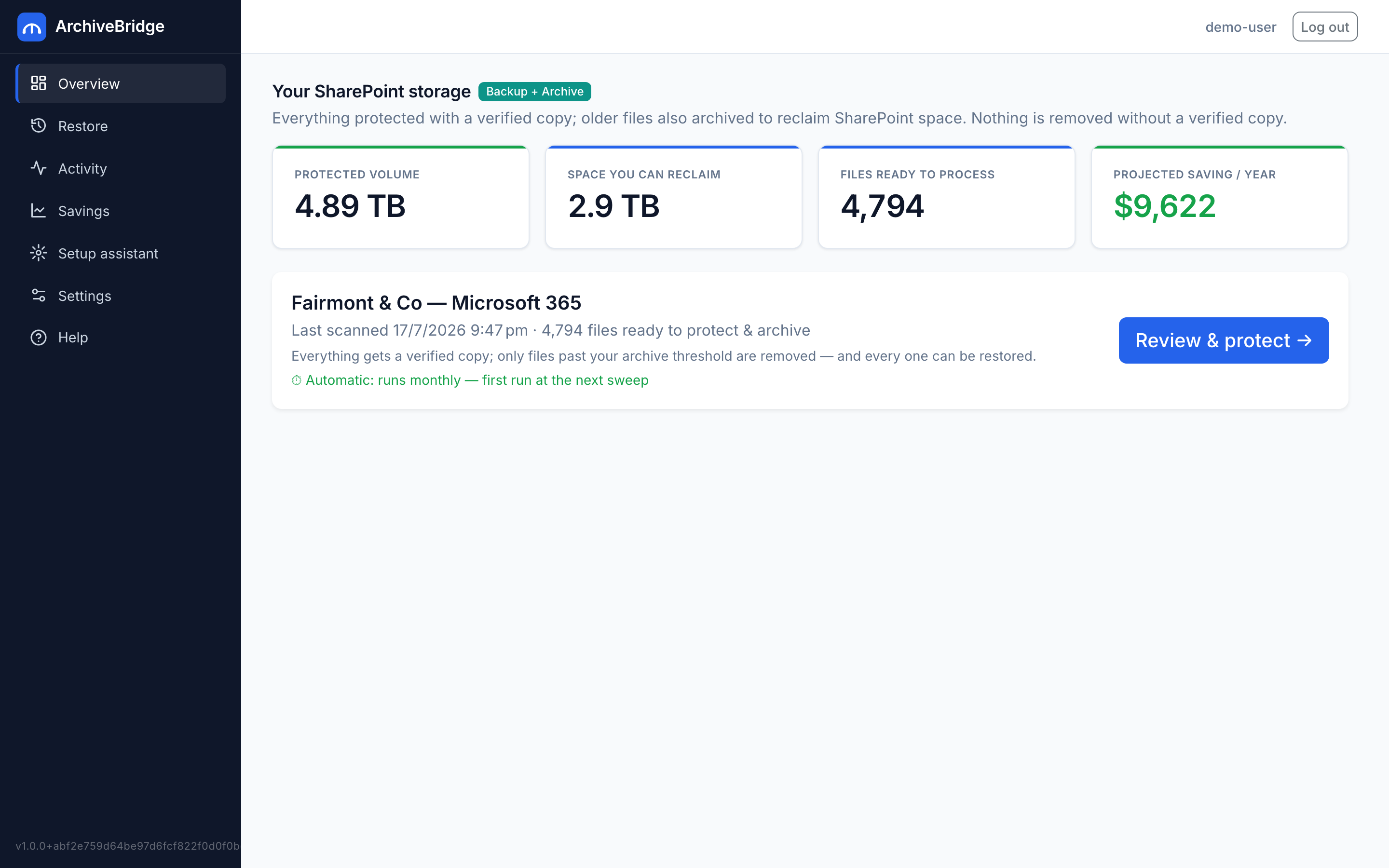
No mockups — screenshots from a live ArchiveBridge console (demonstration tenant, fictitious company names). What you see on day one is what’s here.

Savings — what's under management, what Microsoft would have charged, and your metered bill
Restore — every protected and archived file, with version history and one-click recovery
For MSPs — every client tenant in one white-labelled console
MSP billing — usage metered daily per client, receipts as you go

Or press play and watch it work.

Two narrated tours of the same demonstration tenant — one from the customer’s side, one from the MSP’s. About three minutes each.

The customer tour — scan, archive, self-service restore, and the savings scorecard
The MSP tour — clients, margin, daily-metered billing, and zero restore tickets
The Ledger

See your saving on paper.

Move the sliders to your numbers. No sign-up, no sales call—just the maths, the way your CFO will want to see it. When you’re ready, a real read-only scan returns the exact figures for your tenant.

Prefer a full page? Open the SharePoint storage cost calculator or read the complete pricing breakdown →

SharePointArchiveBridge
Cold data stored4.8 TB4.8 TB
Cost / monthUS$434US$163
You keep / monthUS$270
Saving / year
US$3,245
Over 3 years
US$9,734
Bill reduction
62%
Run a real scan on my tenant

Figures in USD, ex tax. Savings count only storage above Microsoft’s documented pooled allocation (1 TB + 10 GB per licence). ArchiveBridge all-in is management + object storage (US$34/TB/mo; bring your own storage and pay management only), no egress. Microsoft overage US$0.20/GB. Your scan returns the exact reclaimable volume and a dollar estimate at these stated rates.

Every file leaves a forwarding address.

The question every IT director asks: what do my users actually see? Here’s exactly what happens.

In SharePoint

Before

report-2021.docx · 48 MB
The mechanism

ArchiveBridge

SHA-256 verified copy
→ verified removal from SharePoint
→ HTML restore page written
What the user sees

After

report-2021.docx.html · restore page

A clickable HTML page—the original name with .html added—sits where the file was. Open it, hit Restore—one click, no IT ticket. Or surface everything as a mapped drive via CentreStack, as if nothing changed.

Files under retention labels or legal hold are skipped and quarantined—never touched.

Verify first

We delete nothing we haven’t verified.

We request only the permissions you grant through Microsoft 365 admin consent—least-privilege, app-only Graph access, no stored user credentials. Secrets are DPAPI-wrapped at rest on Windows; transit is TLS 1.2+; storage is your own bucket. Every action is written to an exportable audit log.

The trust ladder

Two separate Entra apps. Two separate consents.

To scan, you consent to a read-only Entra application holding two read-only scopes—Sites.Read.All to read what is reclaimable and Organization.Read.All to read your licensed seat count, which sizes your storage allowance. No write, no delete: the Microsoft admin-consent screen shows exactly those two. A second, independent app with write access is introduced only when you choose to archive. You can verify both registrations in your own Entra admin center at any time. ArchiveBridge cannot archive a tenant that has only granted read.

Two-stage consent — read first, write only to archive
SHA-256 verify before delete
Your bucket, your keys — never marked up
Full exportable audit log

Data residency:your object-storage bucket lives in the region you choose—Australia included.

Read the full security model →Download the security fact sheetAsk a security question
archivebridge · audit.logappend-only · exportable · every action recorded
10:42:07 SCAN tenant=contoso cold>730d found=18,442 reclaimable=2.41 TB
10:42:09 COPY finance/2021/EOFY-final.xlsx → object-store 48.2 MB
10:42:09 VERIFY sha256 a3f9…d21e ✓ match
10:42:09 DELETE finance/2021/EOFY-final.xlsx original removed
10:42:09 STUB finance/2021/EOFY-final.xlsx.html restore=/r/9f3a… one-click
10:42:11 SKIP legal/HOLD/contract-1841.pdf reason=legal-hold · quarantined
10:42:13 VERIFY sha256 1b77…c0a4 ✗ mismatch → HALT admin notified
Who it’s for

Works for your team—or for your clients.

For your organisation

Run it yourself. No partner required.

Connect your Microsoft 365 tenant, point it at your own storage bucket, and choose which SharePoint sites to archive—all from a self-service console built for a single company.

For MSPs

Manage every client from one console.

One login across all your client tenants, white-label the client-facing view, and set your own margin on storage—per client, transparently.

Built for partners

Your clients see your brand. Their data is stored in the region you choose.

01A multi-tenant console with an n-level account tree — built with MSPs as a priority.
02White-label the client-facing experience end to end.
03Set your own markup on object storage — per client, transparently.

Consent-first onboarding and per-tenant reporting, designed for the way MSPs actually work.

Partner (you)
Client A
Client B
M365 tenant
M365 tenant
The guarantee

You don’t have to take our word for any of it.

01 · verify

SHA-256 before delete

Every byte is hashed and confirmed in object storage before a single original is removed. One mismatch halts the job and names the file.

02 · protect

Holds are untouchable

If a file is under a retention label or legal hold, we leave it where it is and log why. We never touch what you're obliged to keep.

03 · restore

Always reversible — one click

A clickable HTML restore page sits in SharePoint where the file was; anyone with access brings it back in one click. IT can restore from the console too, or surface a normal drive. Nothing here is one-way.

The full path—scan, SHA-256-verified copy to your bucket, verified removal from SharePoint, HTML restore page, restore—runs end to end in production today. We’re in early access with Australian MSPs and direct customers—which means founding-customer attention, direct access to the engineers, and pricing that rewards being early. Covered today: SharePoint Online; OneDrive and Teams files are on the roadmap.

Stop paying Microsoft to archive your past.

One read-only scan shows the exact volume, and the estimated dollars, before a single file moves.

Run a free read-only scanTalk to an engineer

Sign up, grant read-only consent, and get your actual GB and dollar figure—automated, no sales call. Nothing leaves your tenant until you explicitly start an archive, and every archived file stays restorable for as long as it remains in your storage bucket.